What Is ADA Compliance for Websites?
ADA compliance for websites means ensuring people with disabilities can access, navigate, and interact with your site without barriers. Technically, this process is called “WCAG 2.2 AA conformance,” so that’s what we’re talking about when we say ADA compliance for websites.
That includes users who rely on:
- Screen readers
- Keyboard-only navigation
- Voice controls
- Screen magnification
- Alternative input devices
In practice, ADA website compliance focuses on how your site is structured and coded, not just how it looks. While the Americans with Disabilities Act predates the modern web, courts have consistently interpreted it to apply to digital experiences.
Because the ADA does not define technical standards, the Web Content Accessibility Guidelines, or WCAG, have become the de facto benchmark. WCAG 2.2 AA is the current standard, so that should be your measuring stick (that’s what our team uses).
WCAG 2.1 AA is still commonly referenced in legal actions and compliance agreements, but 2.2 AA introduces 6 new success criteria. Say you are an eCommerce business. If you’re only adhering to 2.1 AA, you could be leaving yourself open to a potential lawsuit.
Why Accessibility Suddenly Matters More Than Ever
As more commerce, services, and information move online, websites are being treated less like brochures and more like physical locations. Over 61 million adults in the U.S. live with a disability. That is roughly one in four Americans. Courts and regulators increasingly view websites as places of public accommodation, not optional marketing tools.
Websites now handle essential tasks like shopping, booking appointments, accessing healthcare, and applying for education. When a website is inaccessible, it can block people from everyday services.
That is why website accessibility has moved from “nice to have” to business critical. Accessibility improves inclusivity, but it also protects your brand and expands your audience.
There is also a major risk factor many businesses overlook:
- 96% of the top one million homepages have detectable WCAG failures, according to the WebAIM Million Report.
- Web accessibility lawsuits exceeded 5,000 filings in 2025, with websites as the primary target.
- When most sites are technically noncompliant, accessibility lawsuits have stopped being rare events and started becoming a numbers game.
Ignoring accessibility is like leaving your front door unlocked and open, but expecting no burglars to come inside.
Our team at e9digital helps businesses move from reactive compliance to proactive accessibility, reducing risk while improving real user experience.
“We love to approach this from the positive aspect. Let’s do the right thing and try to serve every possible customer.” — Conrad Strabone, Managing Partner & President | e9digital
A Real-World Example: Why Accessible Websites Matter for Screen Reader Users
To understand accessibility, it helps to understand how screen readers experience a website. People with visual disabilities like blindness or sight impairment use screen readers to access and control computers, phones, and other digital devices by converting on‑screen content into speech or Braille output.
Screen readers do not see colors or layouts. They read code. Headings become navigation landmarks. Links are announced out loud. Images are either described through alt text or skipped entirely.
Let’s say a page uses headings only for visual styling, buttons are built with non-semantic elements, images lack alt text, and form fields have no labels. Visually, it may look fine. To a screen reader user, it can be confusing or unusable.
This matters because 66% of people who use screen readers navigate a page by headings. These users are customers trying to shop, patients trying to book appointments, and clients trying to contact your business.
Accessible websites provide:
- Clear page structure
- Predictable navigation
- Meaningful image descriptions
- Functional forms and controls
Without these basics, a website may exist, but it does not truly serve everyone in its audience.
Is ADA Compliance Mandatory for Websites?
There is no single federal law that explicitly states, “your website must be ADA compliant.” That technical detail, however, offers little protection in practice.
Courts have repeatedly ruled that inaccessible websites can violate the ADA, especially when the site supports goods or services offered to the public. As a result, mandatory ADA compliance for websites has become less of a legal debate and more of a practical reality.
Adding pressure is the rise of AI-powered scanning tools. These tools make it easier to identify accessibility violations at scale, allowing more sites to be flagged with less effort. AI does not create new legal obligations (for now), but it lowers the barrier to enforcement.
For small businesses, this means being overlooked is no longer a reliable strategy.
“You spend a few dollars on accessibility, but you serve more customers and avoid lawsuits. Over time, it pays off.” — Conrad Strabone, Managing Partner & President | e9digital
Industries Most Susceptible to Accessibility Lawsuits
While any inaccessible website can be targeted, some industries are sued far more often than others:
- Retail and eCommerce sites are frequently targeted due to complex product pages and checkout flows.
- Restaurants and food services face lawsuits over inaccessible menus and ordering systems.
- Fashion and lifestyle brands rely heavily on visual design that often lacks accessibility structure.
- Beauty and personal product sites use marketing-heavy layouts prone to accessibility gaps.
- Healthcare providers are scrutinized for inaccessible portals and scheduling tools.
- Education organizations face claims tied to inaccessible course content and applications.
- Travel and hospitality sites struggle with inaccessible booking engines and room information.
Even without explicit federal regulations, the risk is real. Inaccessible websites expose businesses to lawsuits, lost customers, and damaged trust. Unfortunately, website accessibility is the new version of a “drive-by” lawsuit, where lawyers would drive around and sue anyone who didn’t have an accessible parking lot. Some lawyers just seek these out for the settlement money.
An ADA compliance assessment helps you understand where your site stands, reduce risk, and improve usability for everyone. Accessibility is not about checking boxes, but rather building websites that work for real people in the real world.
Why ADA Compliance Is Also a Business Advantage
Accessibility is often treated as a legal safeguard. Something you do to stay out of trouble. That framing sells it short. Accessibility is also about reaching more people and making your website easier to use for everyone who lands on it.
When you focus on how to make a website ADA compliant, you are improving clarity, reducing friction, and creating a smoother experience for all users. That includes customers on mobile devices, older users, people multitasking, or anyone trying to get something done quickly.
Accessible websites are often:
- Easier to navigate, with clear menus and predictable page flow
- Faster to use, because users are not fighting confusing layouts or broken interactions
- Clearer in structure, making content easier to scan and understand
- More compatible with mobile devices and voice search tools
There is also a direct business upside. Companies that prioritize inclusive design consistently see higher customer satisfaction and stronger loyalty, according to Microsoft Inclusive Design research. When users feel a site respects their time and abilities, trust follows. And trust is what turns visitors into customers.
At e9digital, we want everyone to be able to access our client’s websites. Accessibility is built into UX decisions, SEO strategy, and site architecture from the start. That approach improves performance, reduces risk, and avoids the costly cycle of fixing issues after launch.
Accessibility is not a tax on creativity or conversion. It is a practical way to build websites that work better for more people, which is exactly what small businesses need when every visitor counts.
4 Most Common ADA Website Accessibility Issues
Most accessibility violations are not rare edge cases or complex technical failures. They are common design and development shortcuts that quietly create barriers for users. In fact, these issues appear on the majority of websites today, about 51 errors per page, on average.
1. Low Contrast Text
Found on 79% of homepages.
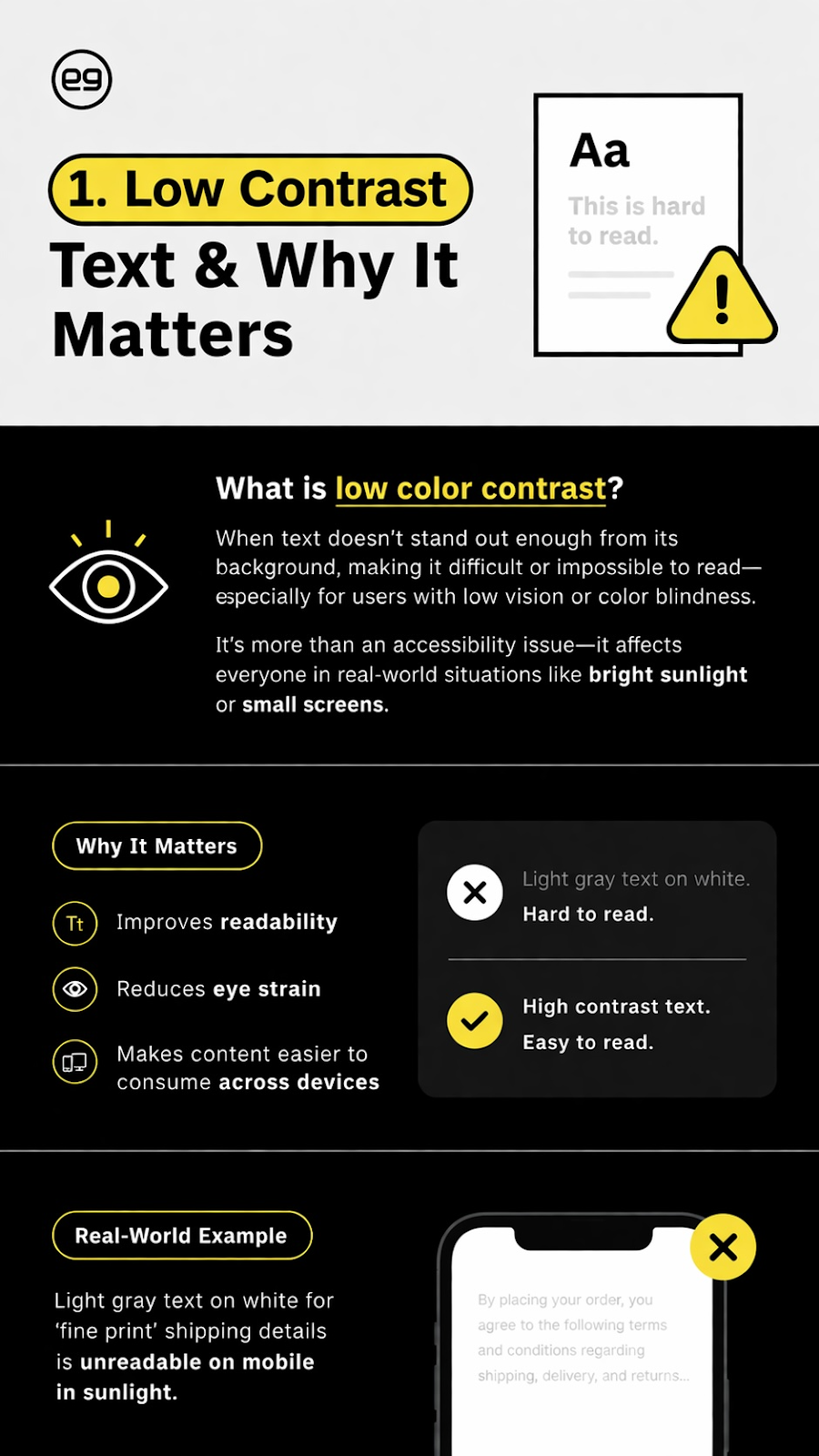
Low color contrast makes text difficult or impossible to read for users with low vision or color blindness. It also affects users in everyday situations like bright sunlight or on smaller mobile screens. When contrast is poor, users slow down, miss information, or abandon the page entirely. Accessible contrast ratios:
- Improve readability
- Reduce eye strain
- Make content easier to consume across devices.
1. Low Contrast Text
Found on 79% of homepages.
Low color contrast makes text difficult or impossible to read for users with low vision or color blindness. It also affects users in everyday situations like bright sunlight or on smaller mobile screens. When contrast is poor, users slow down, miss information, or abandon the page entirely. Accessible contrast ratios:
- Make content easier to consume across devices.
- Improve readability
- Reduce eye strain
Real-World Example: Light gray text on white for ‘fine print’ shipping details is unreadable on mobile in sunlight.
2. Missing Alt Text for Images
Found on 18.5% of home pages.
Alt text allows screen readers to describe images to users who cannot see them. When alt text is missing, meaningful images are skipped or announced without context.
Common consequences include:
- Product images providing no information to screen reader users
- Charts or graphics losing their meaning entirely
- Image-based calls to action being ignored by assistive technology
Well-written alt text communicates intent and function, not visual detail.
Real-World Example: Consider these two alt text descriptions.
- Bad: alt=”shoe”
- Better: alt=”Men’s running shoe, navy, side view”
The second allows a visually impaired individual to have the same website experience.
3. Empty or missing form labels
Found on 34.2% of pages.
Form labels explain what information is required in each field. Without them, screen reader users often hear vague prompts with no guidance, and error messages become difficult to resolve.
This typically leads to:
- Confusing or unusable forms for assistive technology users
- Higher form abandonment rates
- Increased user frustration during submissions
Proper labels improve clarity, accessibility, and completion rates for everyone.
Real-World Example: “Newsletter signup field announces ‘edit text’ with no hint what to type.”
4. Improper heading structure
Found on 39% of pages.
Improper headings are one of the most common accessibility failures because screen readers treat headings as primary navigation, not decoration.
When headings are skipped, misordered, or used only for visual styling, pages become disorienting and hard to navigate. Proper heading hierarchy improves accessibility, readability, and SEO by giving content a clear and logical structure.
Real-World Example: A page jumps from H1 to H4 because the designer liked the size — screen reader users lose the outline.
ADA Compliance Checklist for Websites: 6 Key Factors
ADA compliance is not a single fix, a plugin, or a one-time project. It is a checklist-driven process that touches nearly every part of a website, from page structure to form behavior and user feedback.
Automated accessibility tools catch only a portion of accessibility issues. The rest require human review, judgment, and testing with real assistive technology. That is why shortcuts rarely work.
Our practical ADA compliance checklist focuses on the areas where accessibility failures most often occur.
1.  Semantic HTML Structure
Websites should use HTML elements for their intended purpose. Content needs a clear, logical structure that assistive technologies can understand.
That includes:
- Headings that follow a logical order
- Lists that are marked up as lists
- Interactive elements that behave like interactive elements
What this looks like in practice:
Pages remain understandable even without visual styling. Screen reader users can navigate content efficiently using headings and landmarks, rather than listening to an entire page from top to bottom.
Common mistakes we see:
- Headings used only for visual styling
- Skipping heading levels because “it looks better”
- Clickable elements built in ways assistive technology does not recognize
2. Keyboard Navigation
All functionality must be accessible using a keyboard alone. Users should be able to move through the site in a predictable, logical order without getting trapped.
Key considerations include:
- Logical tab order through content
- Visible focus indicators
- The ability to enter and exit menus, modals, and forms
What this looks like in practice:
A user can navigate the site, complete actions, and recover from mistakes without touching a mouse. Nothing feels hidden or unreachable.
3. Text Alternatives (Alt Text and Labels)
Images and form fields need clear text alternatives so users understand their purpose and context.
This means:
- Informative images with meaningful descriptions
- Decorative images that do not add unnecessary noise
- Form fields with clear, descriptive labels
What this looks like in practice:
Screen reader users receive useful context instead of silence or vague announcements. Forms are easier to understand and complete for all users.
4. Color Contrast Ratios
Text and interactive elements must be easy to read for users with low vision or color blindness. Color should enhance communication, not be the only signal.
That looks like:
- Sufficient contrast between text and background
- Clear visual distinction for buttons and links
- Information not conveyed by color alone
What this looks like in practice:
Content is readable on mobile devices, in bright light, and for users with visual impairments. Important actions stand out clearly.
Common mistakes we see:
- Brand colors applied without contrast testing
- Light gray text used for “secondary” content that becomes unreadable
- Error messages indicated only by red text or outlines
5. Error Identification and Messaging
When users make mistakes, errors must be clearly identified and explained in plain language.
That means:
- Clear error messages that explain what went wrong
- Guidance on how to fix the issue
- Errors associated with the correct form fields
What this looks like in practice:
Users immediately understand what needs attention and how to correct it, instead of guessing or abandoning the form.
6. ARIA Usage (When Appropriate)
ARIA (Accessible Rich Internet Applications) attributes should be used only when native HTML cannot provide the necessary accessibility information. More ARIA does not automatically mean better accessibility.
Key considerations include:
- Native elements used whenever possible
- ARIA applied intentionally, not globally
- Avoiding conflicting or redundant instructions
What this looks like in practice:
Custom components work smoothly with assistive technology without creating confusion or unexpected behavior.
At e9digital, we combine automated scans, manual audits, and real-user testing because that is the only way to meaningfully reduce risk and ensure accessibility works in real-world conditions.
Automated Tools vs Real ADA Compliance
Accessibility overlays and automated plugins promise fast results. They also promise reduced liability. Unfortunately, neither claim holds up under scrutiny.
Accessibility overlays have been named in ADA lawsuits despite being installed, according to the National Federation of the Blind. Tools can help surface issues, but ADA website compliance cannot be automated away.
Automated tools can flag issues, but they cannot replace human evaluation.
- They cannot understand context.
A scanner cannot tell whether alt text is meaningful, whether link text makes sense out of context, or whether content order is logical for screen reader users.
- They cannot evaluate usability.
A tool can confirm a button exists, but it cannot tell whether a user can complete a task, recover from an error, or navigate a complex workflow using assistive technology.
- They cannot guarantee legal compliance.
No tool can certify ADA compliance or eliminate liability. Courts evaluate whether real users can access goods and services, not whether a scan returned a passing score.
Automated tools are useful as part of an accessibility process, but they are not a solution on their own.
How ADA Compliance Benefits SEO and Performance
Accessibility and search engine optimization overlap more than many businesses realize. Google has made it clear that usability and accessibility are part of page experience, and accessible websites naturally align with many SEO best practices.
This is where website accessibility supports performance.
Accessibility helps SEO in practical ways:
- Proper headings improve crawlability: Clear heading structure helps search engines understand content hierarchy and relevance.
- Alt text improves image search: Descriptive alt text provides context for images, improving visibility in image search results.
- Clean HTML improves rendering: Semantic, well-structured code is easier for browsers and search engines to process accurately.
- Better UX reduces bounce rates: When users can navigate and understand a site easily, they stay longer and engage more.
At e9digital, accessibility is built into site architecture and SEO strategy from the start. This avoids duplication, reduces rework, and improves long-term performance.
The Importance of ADA Compliance During Website Redesigns
Accessibility issues are common mistakes during redesigns because they are treated as a secondary concern instead of a core requirement. When accessibility is not defined early in scope, ownership, and success criteria, new designs can unintentionally introduce barriers even if the previous site was more usable.
Common accessibility breakdowns during redesigns include:
- Visual updates that reduce color contrast or readability
- New navigation patterns that are difficult to use with a keyboard or screen reader
- Animations, video, or motion added without captions, controls, or user considerations
- Content updates that misuse headings, links, or image descriptions
- Forms redesigned without clear labels, error messages, or focus order
Technical decisions can also introduce risk. Custom components and third-party tools are often added without accessibility testing, and teams rely too heavily on automated scans that miss real-world usability issues.
When accessibility is treated as a launch checklist item instead of an ongoing practice, redesigns can quietly reset progress and increase legal exposure.
At e9digital, accessibility is a priority, integrated from discovery through QA so redesigns move accessibility forward rather than reintroducing old problems.
“Websites are living things, and they are always in a state of flux, which makes it important to keep an eye on accessibility over time.” — Conrad Strabone, Managing Partner & President | e9digital
Why Businesses Trust e9digital for ADA Website Compliance
ADA compliance is an ongoing responsibility that evolves with your website. With 30+ clients opting into our accessibility services, we’re a trusted source in NYC and beyond.
We keep our client’s websites accessible through:
- WCAG 2.2 AA audits: We evaluate your site against WCAG standards using automated tools, manual review, and real assistive-technology testing to identify meaningful risks and priorities.
- Design and development remediation: We fix structural accessibility issues in code, content, and design, focusing on changes that improve real usability, not cosmetic scores.
- Accessibility-first redesigns: We embed accessibility into redesign strategy, UX decisions, and build processes so compliance is baked in from the start.
- Ongoing monitoring and guidance: We help teams maintain accessibility as content, features, and standards change — reducing long-term risk and surprise failures.
“The e9 team was responsive and supportive. They paid attention to who our brand is, and as a DEI professional, I am thrilled with the way e9 promotes ADA and website accessibility best practices for the user experience.” — Professor Elissa H. Buxbaum, Founder and Director of Education | One Us Consulting
Accessibility Is About More Than Compliance
Accessible websites reduce legal risk, expand your audience, improve usability, and signal trust to every visitor. In 2026, accessibility is no longer a “nice to have.” It is part of building websites responsibly, competitively, and sustainably in a digital-first world. That’s why our team at e9digital is so passionate about accessibility, ensuring that every customer can access your site.
Schedule a call with our team to get started on an accessibility audit.
The post ADA Compliance for Websites: What Your Business Needs to Know appeared first on e9digital.