Pick Your Fighter
Webflow Vs WordPress can feel like a heavyweight matchup. Ask ten web designers which platform wins, and they’ll all have a different opinion. Both can power great business websites, give companies substantial control over design and content, and support a strong SEO strategy.
So the best question to ask is: Which platform is better for your business, your website, your team, and what you need it to do?
Choosing a CMS (content management system) is like choosing a route across Manhattan. The ideal option depends on where you are starting, where you need to go, how quickly you need to get there, and what you are carrying. A route that works perfectly for one business could send another in the wrong direction.
Webflow vs WordPress: Which Is Better?
Spoiler: It Depends. Neither Webflow nor WordPress is universally better.
“WordPress gives you more freedom. Webflow gives you a more controlled system. Neither one does the thinking for you, and that’s the part people underestimate.” — Conrad Strabone, Founder & Chief Happiness Officer | e9digital
Let’s start with the tale of the tape and meet your fighters.
Webflow can be an excellent choice for businesses that prioritize sophisticated visual design, integrated hosting, and built-in website management tools. It powers 0.8% of all websites (about 230k right now)1 with a 1.2% market share.1 It’s a proprietary platform that’s user-friendly, but does have export limitations.
WordPress can be particularly powerful for businesses that want maximum flexibility, extensive content capabilities, greater hosting control, and access to a massive ecosystem of plugins and integrations. It powers 40.2% of all websites with a 58.8% market share.2 It’s open-source software with greater hosting portability, but requires an expert to use efficiently.
As of September 17, 2026, W3Techs estimates that Webflow powers 0.8% of all websites, compared with 40.2% for WordPress. Among websites with a known CMS, Webflow has a 1.2% market share, while WordPress has 58.8%.
The right answer depends on the website.
What Is WordPress? Meet the Platform Behind a Very Big Chunk of the Internet.
WordPress is an open-source content management system, or CMS, that businesses can use to create, publish, and manage websites. WordPress powers approximately 58.8% of websites with a known CMS.3
It began as a blogging platform back in 2003, but that description stopped capturing its capabilities a long time ago.4 Today, WordPress can power everything from a straightforward company website to a large publishing operation, ecommerce store, membership platform, or highly customized digital experience.
WordPress is less like buying one fixed vehicle and more like choosing the engine, parts, driver, and pit crew. That creates more decisions, but it also gives businesses considerable control over what they build.
Why Businesses Choose WordPress
Businesses choose WordPress5 because it can adapt to a wide range of content, technical, and operational requirements. Its biggest strengths become especially valuable when a website needs to grow with the company.
- Flexibility: Themes, plugins, custom code, APIs, integrations, custom post types, and custom fields allow developers to tailor the platform around specific business requirements.
- Content management: WordPress is well suited to blogs, news, case studies, landing pages, portfolios, resource centers, and large content libraries.
- Ecosystem: A global network of developers, designers, hosts, plugins, themes, integrations, and support resources gives businesses plenty of options.
- Hosting choice: Companies can select WordPress hosting based on their traffic, performance, security, support, technical, and budget requirements.
This flexibility can be a real advantage. It also means the strategy, development team, hosting environment, and ongoing maintenance need to work together.
What Is Webflow? Meet the Designer in the Other Corner
Webflow is a website-building platform that’s been around since 2013. It brings visual design tools, content management, hosting, and publishing into a more integrated environment.6
Designers can visually construct layouts, responsive behaviors, and interactions while Webflow generates the underlying website code. That gives experienced designers substantial creative control without requiring them to write every line of code by hand.
For businesses, the appeal is coordination. Design, CMS management, hosting, and publishing can live within the same ecosystem. Think of it like taking an express train instead of coordinating several separate connections. The route is more controlled, but the different pieces are already designed to work together.
That can create a streamlined workflow for businesses whose website needs fit comfortably within the platform’s features and limitations.
Is Webflow a CMS?
Yes. Webflow CMS allows businesses to create structured collections of reusable content rather than manually designing every page from scratch.
A company could use these collections to manage:
- Blog posts, case studies, and portfolio items
- Team members, projects, and locations
- Resources, products, or other structured information
Once the structure and design are established, teams can add new entries while keeping the presentation consistent. It is similar to establishing the route before sending out the next train. The content changes, but it follows the same system.
Webflow’s current Premium Site plan is designed for websites using CMS-driven content, including blogs, portfolios, and other dynamic pages.7
Webflow vs WordPress: Design
Both platforms can produce beautiful, completely professional websites. The difference is largely how you get there.
Webflow was built around visual web design. WordPress can also offer enormous design freedom, but the experience varies depending on whether the website uses a theme, block editor, page builder, or fully custom development.
In a WordPress vs Webflow design comparison, Webflow offers sophisticated visual control within a more managed ecosystem. WordPress provides more ways to approach the job because its ecosystem is much more open.
Think of Webflow as working in a highly equipped professional kitchen where the tools are already arranged, while WordPress lets you choose the kitchen, appliances, tools, and entire crew. Both can produce an excellent meal, but you need experience to make the best choices in each kitchen.
Webflow Design Advantages
Webflow gives experienced designers detailed control through a visual interface. That can make it easier to connect creative decisions with how the finished website behaves.
- Visual development: Designers can control layout, typography, spacing, responsive behavior, animations, and interactions without writing every line of code by hand.
- Integrated design system: Design, content management, and publishing happen within the same Webflow environment.
- Responsive controls: Designers can adjust how pages appear and function across desktop, tablet, and mobile breakpoints.
That visual approach does not mean every Webflow site is automatically well designed. Having access to a Broadway stage does not mean you know how to put on a great show. The skill of the designer and the strategy behind the website still determine whether the audience stays engaged.
WordPress Design Advantages
WordPress supports several design and development approaches. Businesses can choose a setup based on their budget, internal resources, branding, functionality, and long-term plans.
- Almost unlimited approaches: A website can use a custom theme, block theme, page builder, third-party framework, or completely custom development.
- Developer freedom: Because WordPress is open source, developers have extensive control over how the website looks, works, and connects with other systems.
- Huge ecosystem: Businesses can work with different tools and development teams instead of being tied to one visual workflow.
That freedom can be especially valuable when a website has unusual requirements. It also makes choosing the right development partner important because WordPress projects can vary dramatically in quality.
Webflow CMS vs WordPress CMS: Think Beyond Launch Day
Businesses often spend months thinking about how a website will look on launch day and little time thinking about who will update and maintain it six months later.
Your CMS determines how easily your team can publish the information that keeps your website useful. Launch day may get the ribbon cutting, but the real test comes when your team needs to publish a case study before a meeting, update an employee profile, or create a new landing page without calling a developer.
WordPress CMS Strengths
The WordPress CMS has deep roots in publishing and can support straightforward or highly complex content operations.
It is particularly well suited to:
- Frequent publishing
- Blogs and newsrooms
- Large resource centers
- Multiple authors and user roles
- Complex content structures
- Custom content types
- Websites that need to expand their functionality
WordPress can give content-heavy organizations plenty of room to grow. Like a subway system with many lines and transfer points, it can support a lot of destinations. The setup needs to be planned properly so editors can reach those destinations without getting lost.
Webflow CMS Strengths
The Webflow CMS is particularly useful for creating structured collections that follow a consistent visual system. It can work well for templated items like resource libraries, team profiles, and case studies.
Webflow’s current Premium Site plan includes up to 20,000 CMS items and 40 CMS Collections. The Premium plan combines its previous CMS and Business plans into one option for content-driven websites.8
| Platform | Strengths |
| WordPress | Frequent publishing and websites that need expanded functionality. |
| Webflow | Websites that need templated resources with minimal customization. |
That integrated structure can make ongoing publishing more straightforward, provided the organization’s content requirements fit comfortably within Webflow’s system.
Webflow SEO vs WordPress: Yes, Google Can Find Both of Them
One of the most persistent misconceptions in platform comparisons is that choosing one CMS automatically gives a website better SEO. However, both platforms can support strong search performance. The real Webflow SEO vs WordPress decision depends on how well the website and content are planned, built, and managed.
Important SEO factors include:
- Website architecture and technical implementation
- Useful content aligned with search intent
- Page performance and mobile usability
- Internal linking and metadata
- Structured data
- Backlinks and authority
- Ongoing measurement and optimization
Is WordPress SEO Friendly?
Yes. WordPress gives businesses substantial control over content, URLs, metadata, website structure, internal linking, and other important search elements.
Its SEO capabilities can also be extended through plugins and custom development. That flexibility allows experienced teams to build highly sophisticated search programs around the platform.
However, installing WordPress or adding an SEO plugin does not make a website optimized. A plugin may identify missing metadata or help generate a sitemap, but it cannot replace keyword research, content strategy, technical expertise, or good judgment.
Is Webflow Good For SEO?
Yes. Webflow SEO includes built-in controls that help businesses and their development teams manage important technical and on-page elements (similar to WordPress).
Webflow also offers AI-assisted features for tasks such as generating schema markup, filling in missing metadata, and producing alt text.9
Those tools can make implementation more efficient, but they still require a strategy. Google is not grading the CMS logo at the bottom of the page. It is evaluating whether the website is useful, accessible, technically sound, and relevant to the search.
Webflow vs WordPress: Plugins, Integrations & Customization
The difference between the two platforms becomes especially clear when a website needs to connect with other tools or perform specialized functions.
WordPress offers a much larger third-party ecosystem. Webflow takes a more integrated approach, with more of the core website experience managed within its own platform.
Neither model eliminates technical decisions. They simply put those decisions in different places.
WordPress Extension Opportunities
Plugins and custom integrations can turn WordPress into much more than a standard marketing website.10
Common opportunities include:
- Selling and access: Ecommerce, memberships, events, and appointment scheduling can support transactions or restricted content.
- Lead generation: Forms, CRM connections, and marketing automation can move prospects from the website into a sales process.
- Visibility and measurement: SEO, analytics, and advanced search tools can improve discoverability and provide performance data.
- Operations and protection: Security, backups, accessibility tools, and custom workflows can support maintenance and internal processes.
More freedom means more decisions. Plugins can create compatibility conflicts, security concerns, performance issues, update requirements, subscription costs, and vendor dependencies. A strong development team makes sure every addition makes sense, instead of treating the plugin directory like an all-you-can-eat buffet. If you do that, your website looks like an overflowing plate of food that’s way too much to eat.
Webflow Approach
Webflow also offers apps, integrations, APIs, and options for adding custom code. However, more of its core website functionality is controlled within the Webflow platform itself.
That can simplify certain workflows because design, content, publishing, and hosting are built to operate within the same environment. There may be fewer separate pieces for a business to coordinate.
The tradeoff is that companies have less freedom to modify the underlying platform than they would with an open-source CMS. Webflow sets more of the route, schedule, and rules of the road. That arrangement can be efficient when the destination fits the route, but limiting when a business needs highly specialized functionality.
Webflow vs WordPress: Hosting
Hosting represents a fundamental difference between Webflow and WordPress.
With Webflow, hosting is integrated into its Site plans. With self-hosted WordPress, the business selects a separate hosting provider.
Neither model is automatically better. They offer different advantages depending on your needs, including convenience, flexibility, control, and responsibility. WordPress hosting allows companies to compare providers and environments, while Webflow packages hosting within its larger platform.
Webflow Hosting
A paid Webflow Site plan allows a website to publish to a custom domain and unlocks additional site-level functionality. Each Webflow website using a custom domain requires its own Site plan.11
Integrated Webflow Pricing and hosting can reduce the number of vendors a business needs to coordinate. Webflow manages more of the underlying hosting environment, allowing the website team to focus on design, content, and publishing.
The tradeoff is dependence on Webflow’s infrastructure, plan structure, features, and limitations. Businesses do not shop among independent hosts in the same way they can with WordPress.
WordPress Hosting
Businesses using WordPress can select a hosting environment based on their traffic, security, performance, support, and technical requirements.12
Common WordPress hosting options include:
- Shared hosting: Multiple websites share server resources, usually at a lower cost.
- Managed WordPress hosting: A provider handles many platform-specific tasks, including updates, backups, and performance.
- VPS hosting: A virtual private server provides more dedicated resources and control.
- Cloud hosting: The website uses distributed resources that can scale with demand.
- Dedicated hosting: One organization controls an entire server environment.
- Enterprise hosting: Larger organizations receive advanced scalability, security, workflows, and support.
Having more choices can be valuable, but the cheapest host may create performance, security, or support problems later. Bargain hosting is like taking the local train when you are already late. You may save a few dollars, but the delays can cost much more.
Webflow Pricing vs WordPress Pricing: The Price Tag Isn’t as Simple as It Looks
A useful Webflow Pricing and WordPress pricing comparison should go beyond monthly software and hosting fees. The biggest cost may be choosing the wrong website provider.
A cheap project can become expensive when weak research, generic messaging, poor functionality, or limited planning produces a website that does not generate business. Going the cheap route can even be harmful to your business, because if you have a poorly functioning or insecure website, you lose trust with your clients and customers.
The real costs can include:
- Rebuilding the website sooner than expected
- Wasted marketing and advertising spend
- Lost leads and sales opportunities
- Staff time spent fighting the CMS
- Expensive workarounds and integrations
- Damage to credibility
- Delayed growth
Webflow vs WordPress: Ownership & Portability
Ownership and portability may not be the first considerations raised during a website project, but they belong much higher on the list.
WordPress is open source. A WordPress website can generally move between compatible hosting providers, although the migration still needs to be handled correctly.
Webflow is a proprietary hosted platform. Paid Workspace plans allow users to export HTML, CSS, JavaScript, and assets. However, exported code does not include CMS functionality, ecommerce functionality, user accounts, localized content, site search, or native form processing.13
Changing platforms can be more complicated than changing subway lines, so choosing the right one at the beginning of the project is critical.
Webflow vs WordPress: Final Comparison
The final decision should be based on your business requirements, internal resources, growth plans, and preferred way of managing the website.
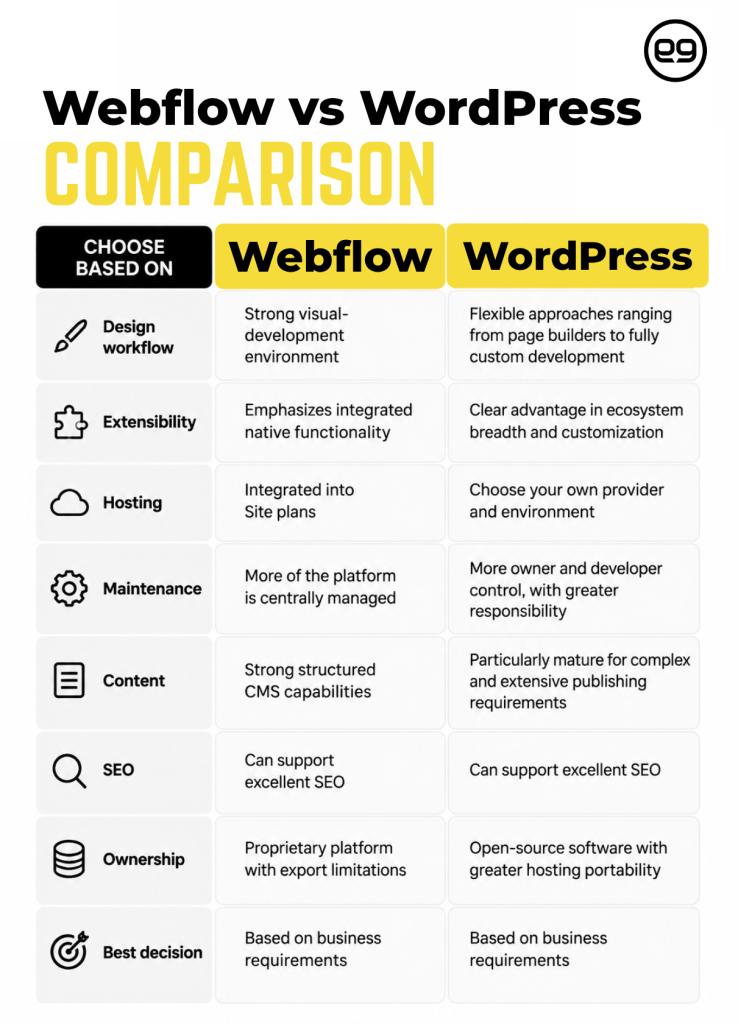
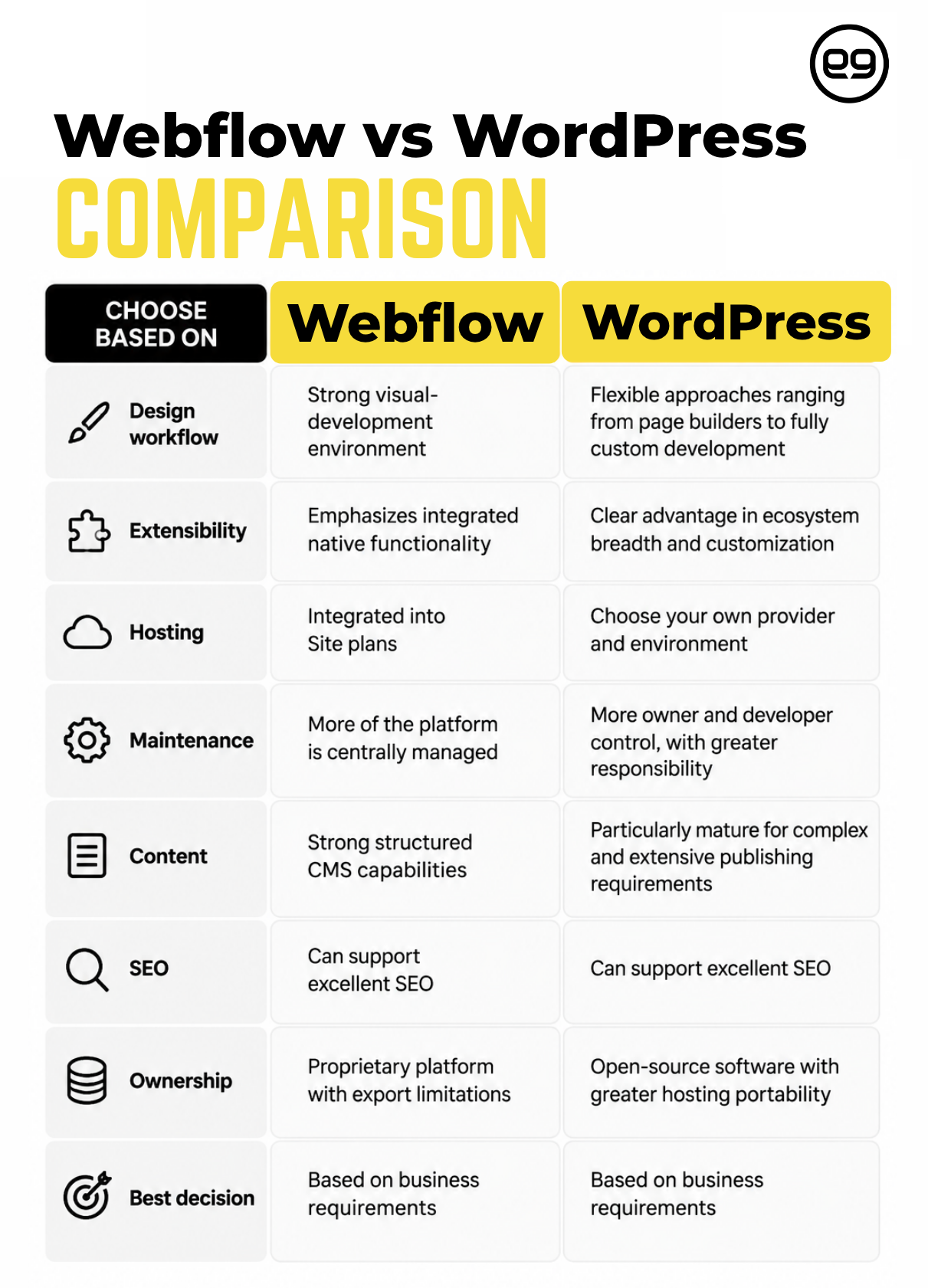
Here is the quick Webflow vs WordPress Comparison:
| Choose Based On | Webflow | WordPress |
| Design workflow | Strong visual-development environment | Flexible approaches ranging from page builders to fully custom development |
| Extensibility | Emphasizes integrated native functionality | Clear advantage in ecosystem breadth and customization |
| Hosting | Integrated into Site plans | Choose your own provider and environment |
| Maintenance | More of the platform is centrally managed | More owner and developer control, with greater responsibility |
| Content | Strong structured CMS capabilities | Particularly mature for complex and extensive publishing requirements |
| SEO | Can support excellent SEO | Can support excellent SEO |
| Ownership | Proprietary platform with export limitations | Open-source software with greater hosting portability |
| Best decision | Based on business requirements | Based on business requirements |
For SEO, it is a draw. Strategy and execution matter more than the logo on the CMS.
A Great CMS Still Needs a Great Website
A CMS is a tool. Clients do not need WordPress simply to own WordPress, and they do not need Webflow simply to say they use Webflow. They need a website that accomplishes something for their business.
The LC|NYC Team’s real estate website shows the difference. e9digital rebuilt the website on WordPress, created a custom listings CMS using Advanced Custom Fields, refreshed the design, and gave the team greater control over how properties are managed and displayed.
The result was valuable because the design, content, CMS, and development were organized around how the real estate team works. Choosing the CMS before defining the business requirements is like choosing a subway line before deciding where you are going. At e9digital, the destination comes first.
Clients don’t need WordPress. They don’t need Webflow. They need a website that accomplishes something for their business.
Let’s Figure Out What Your Website Actually Needs
“People get hung up on WordPress or Webflow. I get it. But your customer doesn’t care what CMS you use. They care whether they trust you and know what to do next.” — Conrad Strabone, Founder & Chief Happiness Officer | e9digital
Webflow and WordPress can both produce excellent business websites.
The difference comes down to what you need from them.
At e9digital, we start with your business, your customers, and what your website needs to accomplish—then build the strategy, design, content, and technology around those goals. We have nearly 20 years of experience, so we walk you through the process to help you understand exactly why we recommend what we do.
Because the right website isn’t about choosing the trendiest CMS. It’s about choosing the right solution for your business.
Frequently Asked Questions
Is Webflow Better Than WordPress for SEO?
No, Webflow SEO vs WordPress does not have an automatic winner. Both platforms can support strong technical and on-page SEO. Website structure, content quality, search intent, performance, authority, and implementation generally matter more than the CMS you choose.
Is WordPress More Popular Than Webflow?
Yes. As of September 17, 2026, W3Techs reports that WordPress powers approximately 40.2% of all websites, compared with approximately 0.8% for Webflow. Among websites with a known CMS, their respective market shares are 58.8% and 1.2%.14
Is Webflow Easier to Use Than WordPress?
It depends on the user and website. Designers familiar with visual development may prefer Webflow. WordPress usability varies based on the theme, editor, plugins, customizations, and development approach. Neither platform is universally easier for every team.
Which Is Cheaper: Webflow or WordPress?
It depends on the complete website setup. WordPress pricing may include hosting, development, premium plugins, maintenance, and support. Webflow combines hosting and platform features through its plans. Businesses should compare the total cost of ownership and the potential cost of choosing a solution that cannot support their goals.
Can You Move From WordPress to Webflow?
Yes, but the migration should be carefully planned. Complex WordPress functionality, custom content types, or plugin-driven features may need to be recreated differently in Webflow. Redirects, metadata, content, integrations, and search visibility also need to be protected.
Is Webflow or WordPress Better for Small Businesses?
Both can be excellent choices. A smaller, design-focused website may fit Webflow particularly well. A business expecting extensive content, specialized integrations, or custom functionality may benefit from WordPress. WordPress vs Webflow should be decided based on requirements, not business size alone.
Webflow vs WordPress vs Squarespace: Which Should I Choose?
Webflow vs WordPress vs Squarespace represents three different approaches. Webflow emphasizes visual development and an integrated platform. WordPress emphasizes flexibility and extensibility. Squarespace emphasizes an accessible, all-in-one website-building experience. The right choice depends on the design control, customization, content, and technical flexibility your business requires.
Resources
- https://ful.io/technology/CMS/Webflow
- https://w3techs.com/technologies/comparison/cm-webflow,cm-wordpress
- https://w3techs.com/technologies/comparison/cm-webflow,cm-wordpress
- https://wordpress.org/about/history/
- https://wordpress.org/
- https://webflow.com/
- https://help.webflow.com/hc/en-us/articles/33961232582419-Choose-a-Site-plan
- https://webflow.com/blog/simplified-plans-and-updated-pricing-2026
- https://webflow.com/feature/seo
- http://wordpress.com/plugins
- https://help.webflow.com/hc/en-us/articles/39720458831635-Do-I-need-a-Workspace-plan-or-a-Site-plan
- https://wordpress.org/hosting/
- https://help.webflow.com/hc/en-us/articles/33961386739347-How-do-I-export-my-Webflow-site-code
- https://w3techs.com/technologies/comparison/cm-webflow,cm-wordpress
The post Webflow Vs WordPress: Which Is Right for Your Business? appeared first on e9digital.